

Disk forensics techniques are used to acquire the disk image, process this image to find artifacts of interest including deleted ones.
In this lab, a disk image file “evidence.img” is provided in the home directory of the root user (/root/). Interact with the image using The Sleuth Kit and answer the following questions:
-
What is the image format type of the image?
-
Which file system type is used in the image?
-
Which directory was mounted most recently from the disk whose image is provided to us?
-
List the names of the directories present on the image.
-
What is the name of the file present in the notes directory?
-
Retrieve the flag kept inside the flag.txt file.
Let’s check which file types are possible
img_stat -i list

img_stat -t evidence.img

Answer 1: raw
To answer question 2 let’s list the supported file types first
fsstat -i raw -f list

fsstat -i raw -t evidence.img

Answer 2: ext4
I’ll go ahead to get the directory that was mounted most recently
fsstat -i raw -f ext4 evidence.img

answer: /mnt/disk0
To list the names of the directories that are being present in the image I’ll use the following command:
fls -i raw -f ext4 evidence.img

Answer 4: notes, photos, videos
To get the name of a specific file in the notes directory I use the following command:
fls -i raw -f ext4 evidence.img 12

Answer 5: flag.txt
Now I need to find a way to see what’s stored inside the file flag.txt
icat -i raw -f ext4 evidence.img 16 >flag.txt

Answer 6: baa82c37e53e2886a8a1379f4e3c2999
In dem Artikel «Disk Forensics P1″ auf cybercop-training.ch wird beschrieben, wie man mit Hilfe von The Sleuth Kit eine forensische Analyse eines bereitgestellten Disk-Images durchführt. Welche spezifischen Befehle und Werkzeuge aus The Sleuth Kit werden verwendet, um das Dateisystem des Images zu identifizieren, die darauf enthaltenen Verzeichnisse aufzulisten und den Inhalt einer bestimmten Datei auszulesen?Regard <a href=»https://dte.telkomuniversity.ac.id»>Teknologi Telekomunikasi</a>
To get information about the partitiontable you can use the mmls command.
For listing the contents of a partition you can use the fls command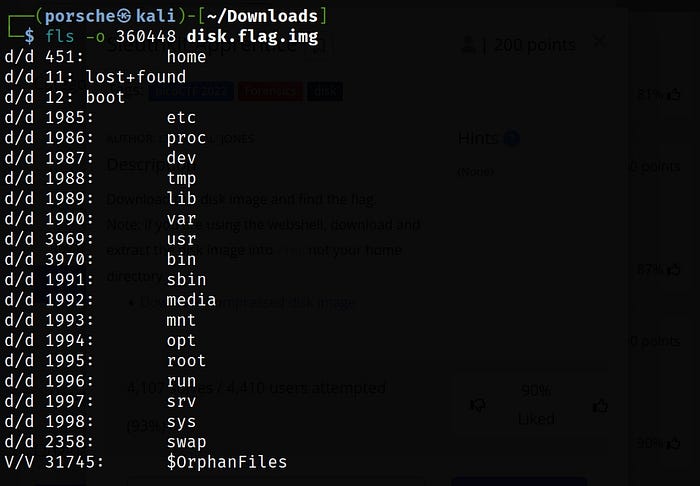
To extract a specific file you can use the icat command followed by the inode number

I would also recommand a tutorial which gave you a nice overview over the different commands:
https://www.youtube.com/watch?v=2a4ZG8hbk0A
Hope that helps
Welche journalistischen Stilmittel tragen dazu bei, dass eine Dokumentation wie „Im Schiffsgefängnis“ emotionalisierend wirkt, und welche Vor- und Nachteile hat diese Herangehensweise im Vergleich zu einer nüchternen, analytischen Berichterstattung?Visit us <a href=»https://dte.telkomuniversity.ac.id»>Teknologi Telekomunikasi</a>